
Archiving a Smart Funnel takes the funnel out of operation. If it still has conversations, the platform requires you to choose a destination funnel and say, stage by stage, where each conversation goes, so no lead is left without the AI's service.
Available on: all plans.
Who can do it: admins and users with access to the Smart Funnels module.
Module: Side menu > Smart Funnels > open the funnel > three-dot menu > Archive funnel
Before you start
-
Know which funnel the conversations will move to; it must be active
-
Know the destination funnel's stages, because the mapping is done stage by stage
-
Remove the links that block archiving (see What prevents archiving)
Archive a funnel
-
In the side menu, click Smart Funnels and open the funnel you want to archive
-
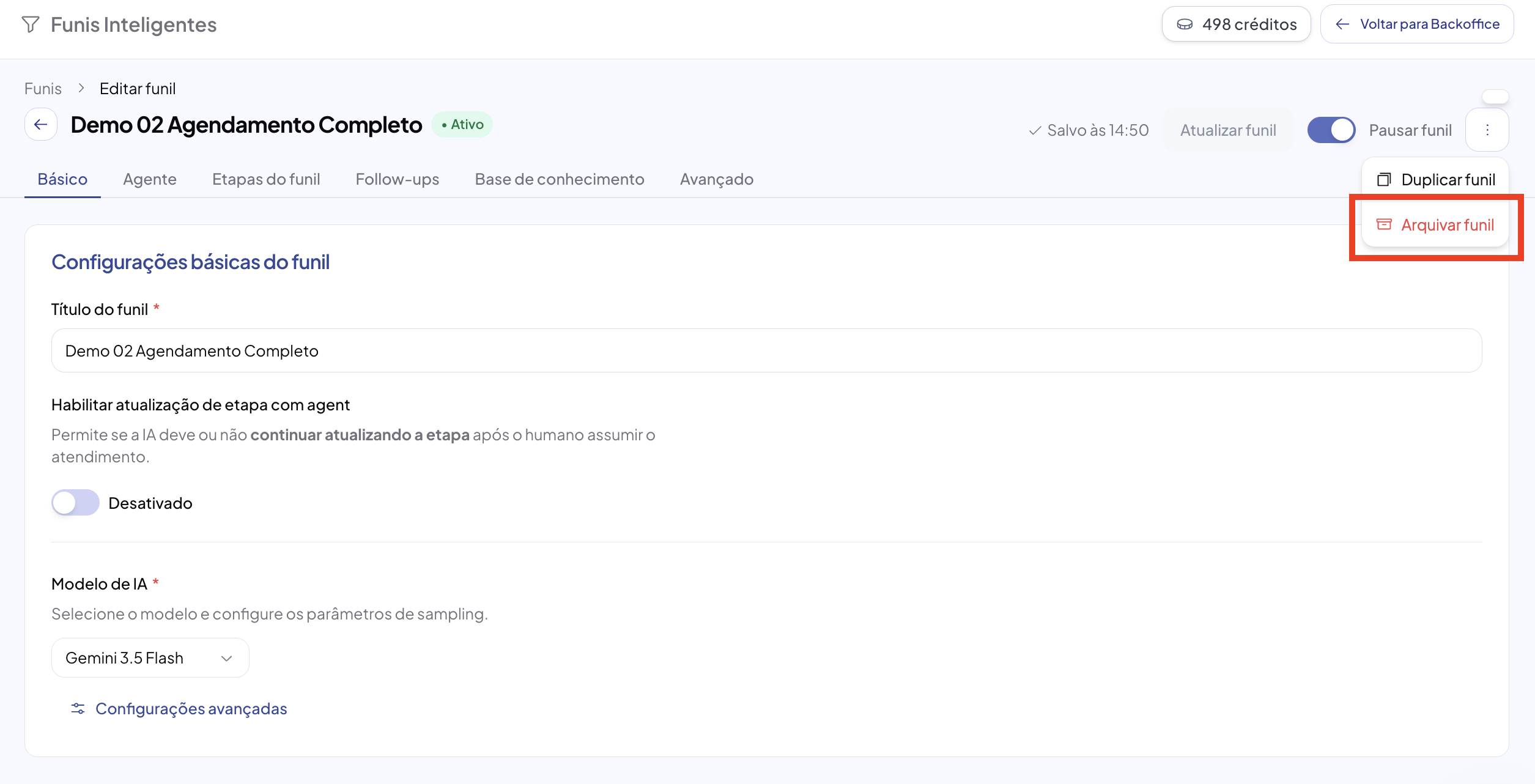
In the top right corner, click the three-dot menu and choose Archive funnel
-
The Archive funnel? window opens and the platform automatically checks the funnel's status
-
Follow the path that shows up:
-
No conversations — the window only asks for confirmation. Click Archive
-
With conversations — choose the Destination funnel and the destination for each stage, then click Archive
-
With active links — the window lists what needs to be resolved and the Archive button isn't available
-
What prevents archiving
The platform blocks archiving when the funnel is still being used in any of these three places. The window shows the name of each link found.
| Block | What it means | How to fix it |
|---|---|---|
| Active campaign | There's an active campaign using this funnel | Pause or finish the campaign |
| Channel using this funnel as default | An inbox has this funnel as its default funnel | Change the channel's default funnel in Platform > Channels |
| Team with this funnel as default | A team has this funnel as its default funnel | Change the team's default funnel in Platform > Teams |
Choose the destination funnel
-
In Destination funnel, open the list and choose the funnel that will receive the conversations
-
Only active funnels other than the one being archived show up
-
If you change the destination funnel, the stage mapping is cleared and needs to be redone
Map the stages
Under Where each stage goes, the platform lists the current funnel's stages that have conversations and asks for a destination for each one. Empty stages don't show up, because they don't move anything.
-
Next to each stage, see the conversation count — for example, (37 conversations, 12 open)
-
Choose the matching destination stage in the chosen funnel
-
Repeat for every listed stage — the Archive button is only enabled when the mapping is complete
Conversations without a stage
If there are conversations with no stage set, or pointing to a stage that was removed from the funnel, the window shows a notice like “3 conversations have no stage and will go to the destination funnel's first stage.” These conversations are moved automatically to the destination's entry stage, and the total transferred shows in the success message.
Understand the numbers on screen
The window shows two different counters, and they aren't the same number:
| Number | What it counts |
|---|---|
| Total conversations | All of the funnel's conversations, in any status — including resolved ones. This is what will be transferred |
| Open conversations | Only open conversations. This is the number shown on the funnel's card in the list |
What happens when you confirm
-
The conversations are transferred to the destination funnel, each one in the stage you mapped
-
The funnel moves to the archived status
-
The success message shows how many conversations were transferred
-
The transfer and the archiving happen together: if for any reason a conversation is left in the funnel, nothing is archived and no conversation is moved
Common errors and solutions
| Message | Likely cause | Solution |
|---|---|---|
| “This funnel is in use and can't be archived” | An active campaign, channel or team uses this funnel as default | Remove the links listed in the window itself and reopen Archive funnel |
| “Map the destination stage for: …” | A stage with conversations was left without a chosen destination | Choose the destination for the stages named in the message |
| “The destination funnel must be active…” | The chosen funnel was paused after you opened the window | Activate the destination funnel or choose another one |
| “N conversations are still in this funnel. Nothing was archived, try again.” | A new conversation arrived in the funnel during the migration | Repeat the operation — nothing was changed |
| “The destination funnel has no entry stage…” | There are conversations without a stage and the destination funnel has no entry stage set | Set the destination funnel's entry stage or choose another funnel |